
In this article, we explain what to do with the Quick Config Code for the IC-Smart Touch and what the label on the box you have just scanned the QR code from is for.
in this article:
Why this label?
Quick Config Code
On-site commissioning
Why this label?
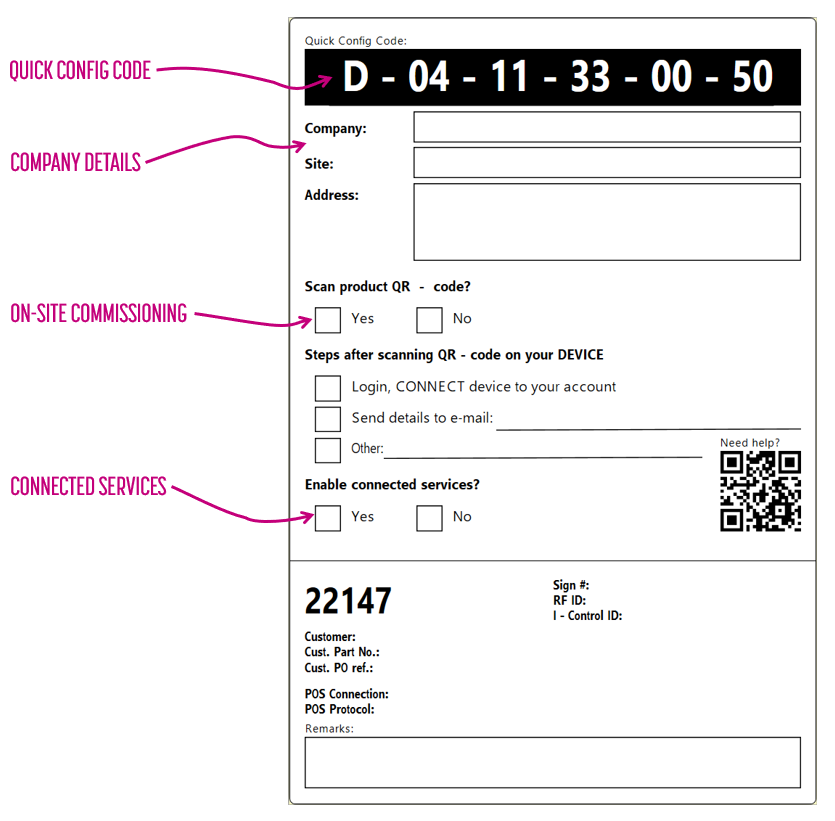
The label is essential for the on-site commissioning of the IC-Smart Touch. This label can be completed by a work planner. They can use it to specify what should be done with the IC-Smart Touch once it has been installed on site by a technician.
This label contains the Quick Config Code, which allows the IC-Smart Touch to be configured in a single step, as well as the information required to link the IC-Smart Touch to the end user and the correct location/site.
Quick Config Code
You can read more about the Quick Config Code in this article: Quick Config Code
Company details
When commissioning the device, the technician must specify the company and site where the IC-Smart Touch has been installed. The work planner can enter this information here on the label.
In addition, the work planner can, of course, also transfer the IC-Smart Touch to the correct site in the Bever Dashboard or via the Bever App in advance.
On-site commissioning
If the IC-Smart Touch is already linked to a company and site and the IC-Smart has already been configured (possibly using the Quick Config Code), the technician no longer needs to scan the QR code for commissioning.
The work planner can use this option to indicate whether the IC-Smart still needs to be commissioned by the technician.
Commissioning options
The work planner or organisation responsible for preparing the installation of the IC-Smart Touch can specify here what needs to be done with the IC-Smart Touch during the commissioning process. This includes linking the IC-Smart Touch via a login on the dashboard. In that case, the technician must be the end user or a trusted partner of that end user.
Alternatively, the technician can delegate the task of linking the IC-Smart Touch to company and site to someone else. In that case, the work planner can enter the email address of the person who will complete the commissioning process.
This person must have access to the Bever Dashboard. See the following article for commissioning on site;
IC-Smart Touch - On-site Commissioning
Connected services
Please indicate here whether the IC-Smart will be using connected services.
If the IC-Smart Touch is to receive prices via the Bever Dashboard, a device licence is required. Please check the the following article for more information about Assigning a device licence to your device
IC-Smart Touch instruction videos
On-site Commissioning - Linking to the Dashboard - Frst use
More IC-Smart Touch
IC-Smart Touch installation requirements